Find an article:

Showing posts with label office. Show all posts

Thursday, September 16, 2010

Great All Round PC!

This month we have a special on a new computer package:

Intel Core i5 650 3.2 Ghz Dual Core Processor (upgrade to Quad core for less than $50)
Asus P7P55 Motherboard (dual video card slots for CrossFire)
4 GB DDR3 RAM
1.0 TB Hard Drive
Ati HD5770 Graphics Card w/1GB RAM
24x DVD Burner
18.5" LCD with Speakers
Logitech Keyboard/Mouse kit
Windows 7 Home Premium
Microsoft Office Basic (Word, Excel PowerPoint, OneNote)


All for under $1550, installed on site, complete with anti-virus, Microsoft Office etc.!

This system is ready for games, internet, 3D design and much more! Upgrades are available for Graphics cards, CPU, RAM, Hard drive etc. So if there is something that you specifically need (or want), just let us know!

For more details, please contact us here.

Monday, September 6, 2010

Get Your PC Up to Speed!

Is your PC more than 5 years old? Thinking of throwing it out and getting a new one? Depending on your configuration, you can get an upgrade for a fraction of the cost! The motherboard, CPU and RAM are upgraded to current spec Intel or AMD setups, with the option to upgrade the hard drive to faster speeds and greater capacities, all while keeping your existing copies of Microsoft Windows and Microsoft Office and even your current data (no extra software to buy!). For more info on parts, have a look at our eStore at dcnsolutions.localline.com.au, or give us a call for a free quote.

Friday, July 30, 2010

Office Maintenance

Your office computer network is probably the backbone of your business. It stands to reason then to make sure things are configured and running smoothly. Imagine what would happen if a fire breaks out, or thieves break in, and you lose your computer with critical data? A backup solution is imperative, including a list of all CD keys and CD images that you have running, so that you don't have to try to hunt down older software versions when reinstalling on a replacement PC. Also, keep in mind that dust build up inside the PC case can overheat components, and cause major failures, and a regular maintenance schedule is recommended.

Wednesday, July 21, 2010

Speed up your Office!

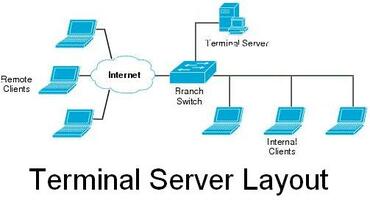
Is your MYOB access time getting slow? Do you have multiple database programs running on each of your computers? Do you need people to access work files from off site locations? If any of those are true, then a Terminal Server may be the ultimate solution for you.

A terminal server is a single computer running a software package that allows multiple, simultaneous remote connections. All information is processed on that single computer and the speed is much greater than VPN as the only information that is sent over the internet/network is, not that actual datafile, but just a virtual screen shot as if you were physically on that computer. This makes MYOB, Retail Manager or other database programs so much faster. Best of all, a terminal server can be setup on just about any computer (must have professional/ultimate/server version of Windows, and 2GB+ RAM), for under $400. For more information on a Terminal Server, and if it is appropriate for you, please contact us.

Thursday, June 24, 2010

Microsoft Office 2010 is Available Now!

Microsoft's latest version of Office is now available. As the 2007 version is not going to be made anymore, Office 2010 will be available on all new computer purchases after our supply of 2007 is gone.

Office 2010 offers new and improved features, such as an easy to navigate menu, picture editing functions, and improved security. For more info, please have a look at our eStore listings for OEM Microsoft Office 2010.

Sunday, June 6, 2010

Office Maintenance

Your office computer network is probably the backbone of your business. It stands to reason then to make sure things are configured and running smoothly. Imagine what would happen if a fire breaks out, or thieves break in, and you lose your computer with critical data? A backup solution is imperative, including a list of all CD keys and software that you have running, so that you don't have to try to hunt down older software versions when reinstalling on a replacement PC. Also, keep in mind that dust build up inside the PC case can overheat components, and cause major failures, and a regular maintenance schedule is recommended.