 One of our most popular setups is Remote Desktop. This is a system that allows you to access one computer's screen from another over the internet. For example, say you needed to check some figures in MYOB, but it is only installed on your work computer in your office. You can use Remote Desktop to access your work computer from home over the internet! This same setup can be used if you have multiple people in off-site locations that need access to resources from the one computer (this is called a Terminal Server). For more information on Remote Desktop, please contact us!
Showing posts with label remote. Show all posts
Showing posts with label remote. Show all posts
Monday, September 27, 2010
Remote Desktop - Access Your PC from Anywhere!
One of our most popular setups is Remote Desktop. This is a system that allows you to access one computer's screen from another over the internet. For example, say you needed to check some figures in MYOB, but it is only installed on your work computer in your office. You can use Remote Desktop to access your work computer from home over the internet! This same setup can be used if you have multiple people in off-site locations that need access to resources from the one computer (this is called a Terminal Server). For more information on Remote Desktop, please contact us!

Tuesday, August 24, 2010
Terminal Server: Is it Right for Your Business?
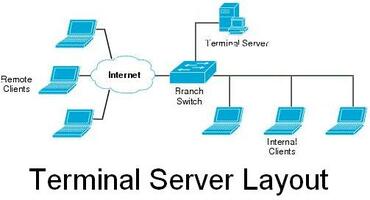 A terminal server is a single computer running a software package that allows multiple, simultaneous remote connections. With permissions setup to limit access to certain files, this will allow your employees to access files from any location!
This is especially useful for MYOB, as the only information that is sent over the Internet/network is, not that actual data file, but just a virtual screen shot as if you were physically on that computer.. perfect if you need to have multiple people accessing files while in locations around Perth... or even the state! With a terminal server, not only will MYOB and other database programs run faster, but you have the flexibility to access data wherever you are!
For more information on a Terminal Server, and if it is appropriate for you, please contact us.
Wednesday, August 18, 2010
Access Your PC Anywhere!
 One of our most popular setups is Remote Desktop. This is a system that allows you to access one computer's screen from another over the internet. For example, say you needed to check some figures in MYOB, but it is only installed on your work computer in your office. You can use Remote Desktop to access your work computer from home over the internet! This same setup can be used if you have multiple people in off-site locations that need access to resources from the one computer (this is called a Terminal Server). For more information on Remote Desktop, please contact us!
Thursday, June 17, 2010
Get Remote Help!
 We have just created a new service by which you can get real time support ANYWHERE that has an internet connection. It is the DCN Virtual Helpdesk. Simply call us to arrange a time, then go to our support web page at dcnsolutions.net/support/. Just follow the steps and you are under way! Once the program has been started, you can initiate the connection to the DCN Solutions Server to begin the troubelshooting session.
Subscribe to:
Posts (Atom)